ide-mod
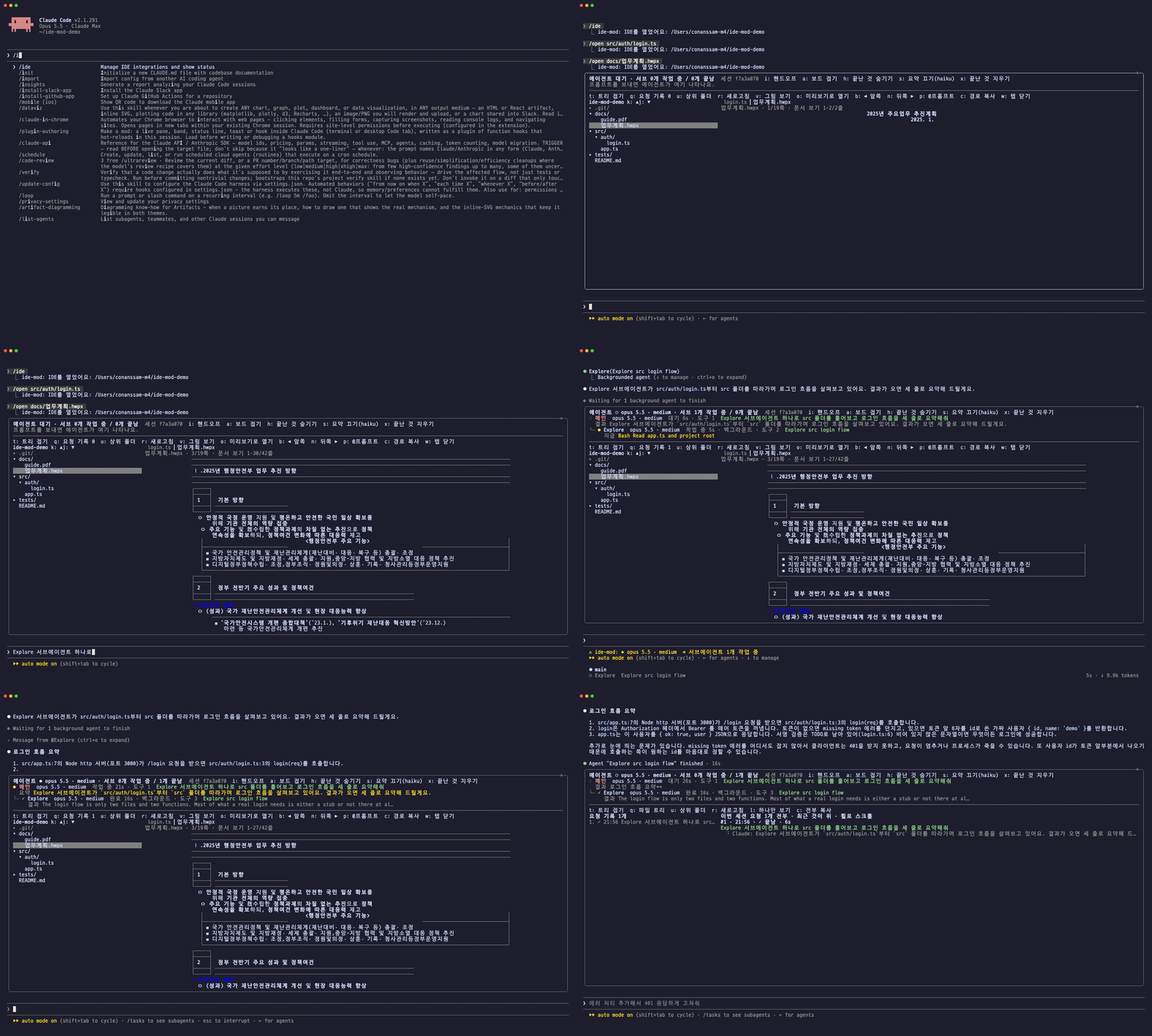
ide-mod is a mod published by the author of this guide. The top of the pane holds system status and the agent board, and the bottom holds a file tree and tabbed editor. Above the prompt, a Claude, Codex, and Antigravity usage band appears. The pane opens by itself when you start a new session.
시스템  메모리 ███████░ 27.0GB/32.0GB · 압력 경고  스왑 22.9GB  디스크 ████████ 94% · 남은 102GB에이전트 ● opus 5.5 1M · xhigh · 서브 1개 작업 중 / 1개 끝남   세션 3132694c  i: 핸드오프● 메인  opus 5.5 1M · xhigh  작업 중 3m12s · 도구 14  로그인 버그 고쳐줘├─ ● Explore  haiku 4.5  작업 중 34s · 도구 6  인증 코드 찾기└─ ✓ general-purpose  sonnet 5.5 · medium  완료 1m02s  테스트 작성──────────────────────────────────────────────────────────────my-project  1-24/57          │ ▎app.ts ●   README.md▾ src/                        │  1 import { login } from './auth'    ▾ auth/                ●  │  2        login.ts           ●  │  3 export const answer = 42
Claude       5시간 █░░░░░░░░░   9% 3시간 후   주간 ██████░░░░  64% 2일 23시간 후Codex        주간 ███░░░░░░░  27% 5일 13시간 후Antigravity  Gemini 5시간 ░░░░░░░░░░   3% 2시간 53분 후   Gemini 주간 █░░░░░░░░░   6%
The mod’s UI text is in Korean, as in the mockup above.
Install
Section titled “Install”-
In a Claude Code session, enter:
/plugin install ide-mod --marketplace jkf87/ide-mod -
When asked whether to add the marketplace, answer
yand choose user as the scope. -
The IDE pane opens by itself in a new session. In the current session, open it with
/ide. If you don’t see it, run/reload-plugins.
When a new version comes out, run /reload-plugins in the terminal, or claude plugin update ide-mod@ide-mod in the desktop app, then open a new session. The desktop app reads the copy it made at install time, so the update only takes effect once it has pulled it.
What it does
Section titled “What it does”- Agent board: Shows the main agent and subagents as a tree of who launched whom. It displays the model, effort, assigned task, current activity, and elapsed time. Tasks a person assigned are green, and current activity is yellow. Every 20 seconds, haiku adds a one-line summary for each agent.
- System status (top of the board): Shows memory use and memory pressure, swap, and disk usage on one line. It turns yellow or red when pressure is at warning or critical, or when swap or disk is nearly full. Press
zto see the 6 apps using the most memory. - Usage band (above the prompt): Shows Claude’s 5-hour, weekly, and per-model weekly limits plus context usage, Codex limits, and Antigravity’s Gemini and Claude/GPT limits, one line per source. Above 70% it turns yellow, above 90% red.
/limits compactmakes it one line, and/limits offhides it. - Explorer: A folder tree and up to 8 tabs. It has syntax highlighting, Markdown rendering, and a
●mark on files Claude edited. - HWP, HWPX, and PDF viewer: Draws pages with rhwp and pdf.js. In terminals without graphics, it shows a text grid that keeps table borders and alignment. In kitty and Ghostty-family terminals, it shows actual page images.
- Request history (
q): Collects the requests you sent this session, in full. Background task notifications and messages from other sessions are left out. It stays even after you reopen the session, andccopies everything. - Handoff (
i): The board shows the session ID. Pressito see the other Claude sessions that are open, plus a handoff text (session ID, transcript path, theclaude --resumecommand, and the requests you sent). Select a session to send it there directly, or presscto copy it and paste it into another agent such as Codex. You can also send it with/handoff <session name> [note]. - Lecture captions (
/lecture): Shows what Claude is doing above the prompt in plain sentences. - Style gate (
/style-gate): Counts AI-sounding patterns in a Korean manuscript and rules pass, warn, or stop.
Commands
Section titled “Commands”| Command | What it does |
|---|---|
/ide [path] |
Opens the IDE pane |
/ide auto on|off |
Sets whether the pane opens by itself in every new session (on by default) |
/open <path> |
Opens a folder or file in the pane |
/limits [full|compact|off|refresh] |
Changes the look of the usage band or refetches it |
/handoff [session name] [note] |
Shows the handoff text or sends it to another session |
/lecture [on|off] |
Lecture captions |
/style-gate [file|on|off] |
Style gate |
Access scope
Section titled “Access scope”Here is what this mod can reach, following the safety checklist.
- File reading: The explorer and document viewers read files in the working folder. Handoff looks up the path of the session transcript file.
- Running programs: To draw documents it runs Node.js and an image conversion program; for the system line it runs
sysctl,vm_stat,df, andps; for usage limits it runscodex app-serverandagy. Codex and Antigravity ask their own services for usage with their own logins. - Network: Every minute it fetches Claude usage limits from Anthropic’s usage API. It uses the session’s credential handle, so the mod never sees the token. Every 20 seconds the board summary sends each agent’s recent activity to haiku (
sturns it off). Both use the Anthropic API on your account. It sends no data anywhere else. - Other sessions: Handoff reads the list of open sessions and sends a message only to the session you select. If the two sessions have different permission modes, the receiving side must approve before it is delivered.
- Usage limits and system status are fetched only while the band or pane is on screen.
- Repository and releases: github.com/jkf87/ide-mod (currently v0.7.1)
- License: MIT (includes rhwp under MIT and pdf.js under Apache-2.0)
Unofficial community guide. Not affiliated with or endorsed by Anthropic. Claude and Claude Code are trademarks of Anthropic.